WINQ-EMU

WINQ-EMU

The best way to run desktop Linux on Windows. With real GPU acceleration.

A modified QEMU with better WHPX support, Venus Vulkan rendering, and a Windows-native display driver. Because your VM deserves better.

~2x faster Vulkan than WSL — 410 vs 226 FPS in SuperTuxKart
Download View on GitHub
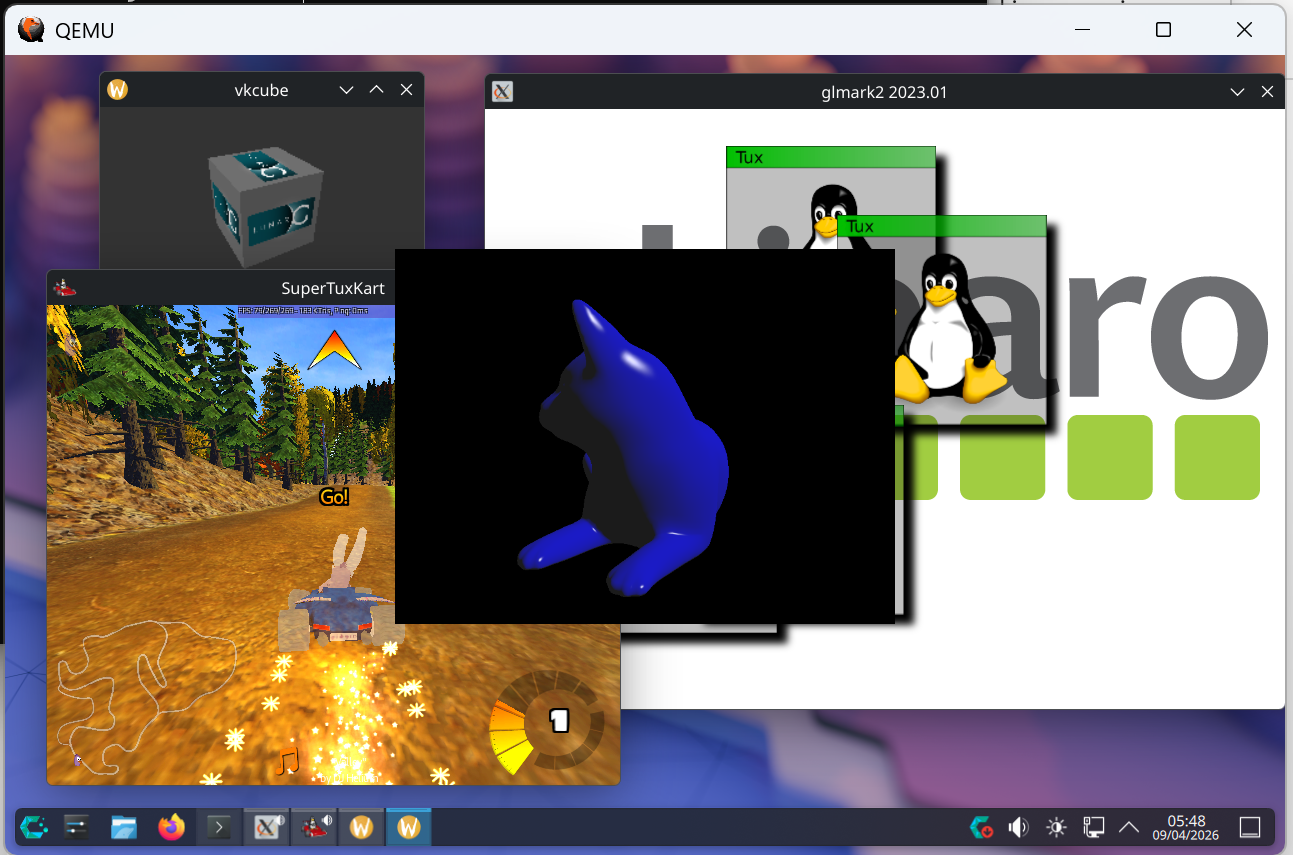
CachyOS Linux running in WINQ-EMU

CachyOS with KDE Plasma running SuperTuxKart, glmark2, vkmark, and vkcube — all inside WINQ-EMU on Windows.

Three things that make it different

Better WHPX Support

Full -cpu host passthrough that upstream QEMU doesn't support on WHPX. Hybrid CPU topology detection pins vCPUs to P-cores. Sub-millisecond timer resolution. Your VM runs at native CPU speed.

Venus Vulkan Rendering

Your Linux VM talks directly to your host GPU through the Venus protocol. Real hardware-accelerated Vulkan. No software rendering. No compromises. (Well, maybe a few compromises. It's alpha.)

Enhanced Display

DPI-aware SDL display with USB tablet support that doesn't freeze, automatic host refresh rate matching, and guest cursor forwarding. No grab deadlocks. No upscaling.

Why this exists

As a heavy Linux user, I have a great appreciation for how QEMU has allowed me to run a virtual machine which is just as capable as the host, with a fully graphically accelerated desktop. I wanted to bring the same Linux desktop experience to Windows, as I found Hyper-V, WSL, and QEMU in its upstream state to be insufficient. Hopefully the community will run with this and we'll end up with an even better Linux VM experience atop Windows.

(But honestly, you should probably just switch to Linux. QEMU is even better there.)

Performance that actually slaps

SuperTuxKart, Vulkan renderer, default settings. CachyOS on both. Intel B580 iGPU.

PlatformFPS
WINQ-EMU (Venus)410 fps👑
WSL2 (CachyOS)226 fps

Nearly 2x faster than WSL. Your mileage may vary. But it'll probably be good mileage.

Getting started

1

Install

Run the installer. Click next a few times. You know the drill.

2

Add a VM

Drop a Linux qcow2 image into the vm folder, or create one in the launcher.

3

Launch

Open WINQ-EMU, pick your settings, hit Launch. That's it.

Here Be Dragons

The QEMU base is on the v11.0.0 tag, virglrenderer is on the 1.3.0 tag, and the Windows / Venus / WHPX patches sit on top as a clean series. But it's still alpha — things might crash, things might look weird, your cat might judge you. Pretty solid for something this experimental, but I'm covering my bases here.

Graphics cheat sheet

Vulkan (Venus)

Works everywhere — Wayland and X11. Just run your Vulkan apps. They'll find the GPU.

OpenGL (virgl)

Works everywhere too. Your desktop compositor uses this by default. It just works™.

OpenGL via Zink

Translates GL to Vulkan for potentially better perf. Works on both native Wayland and X11/XWayland. Set MESA_LOADER_DRIVER_OVERRIDE=zink to try it.

Use BIOS boot, not EFI

EFI boot causes a timing issue that tanks Vulkan to ~5 FPS. Stick with BIOS. I'm looking into it.

New in Alpha 10

PAT MSR sync — faster everything that touches GPU memory

Linux uses the PAT MSR to mark virtio-gpu and Venus shared mappings as Write-Combining. The previous WHPX path skipped syncing PAT in three places, so the guest's cache-type computation could fall back to Uncacheable for memory that should be WC. The fix is a 30-line change in target/i386/whpx/whpx-all.c. Vulkan / OpenGL workloads that move real GPU memory should be measurably faster on Alpha 10.

SLAT entries pinned for big mappings (Win11 24H2+)

WHvAdviseGpaRange(Pin) now hints to the hypervisor that anything 256 MiB or larger should keep its SLAT entries pinned — in particular the base RAM and the 4 GiB Venus blob hostmem region. Before, the hypervisor was free to demote 2 MiB / 1 GiB pages to 4 KiB under host memory pressure, which produced a "60 fps → 30 fps and I have no idea why" cliff under heavy graphics. The 24H2 partition properties silently no-op on older Windows.

5 ms cap on the WHPX inner exit loop

A guest spinning through cheap MMIO / CPUID / MSR exits during a Vulkan submit storm could keep a vCPU thread inside WHvRunVirtualProcessor for tens of ms, blocking the QEMU main loop and timer dispatch. Now we cap time-in-loop at 5 ms wall clock, raise EXCP_INTERRUPT, and yield. Smoother frame pacing without measurably hurting throughput.

x86 FastHypercallOutput, UnimplementedMsrAction drop, faster boot

The ARM path has had FastHypercallOutput=1 for a while; x86 didn't. Now it does — every Hyper-V hypercall (TLB shootdown, IPI cluster) returns via registers instead of a guest-physical output page. And on 24H2+ Windows, UnimplementedMsrAction = IgnoreWriteReadZero tells the hypervisor to handle Linux's couple-hundred boot-time MSR probes in-kernel instead of trapping to userspace.

Ray-tracing acceleration structures get the deferred-destroy treatment

The Intel ICD handle-recycle workaround in vkr_win32_shim.c already covered 14 lightweight Vulkan object types; Alpha 10 adds VkAccelerationStructureKHR. RT games (Quake II RTX, Portal RTX, anything via vkd3d-proton) destroy and recreate AS handles every frame as TLAS rebuilds, so this is the same bug class. If you have a working RT title that previously crashed mid-run, please file an issue with a repro.

Multi-disk support in the launcher

The Disk Image section is now a proper table: add as many qcow2 / raw images as you want, choose virtio / scsi / ide per disk, and the first one boots by default. Exported .bat files round-trip multiple -drive lines so you can keep editing.

WINQ_DIAG=1 — one switch for diagnostic logs

If something looks wrong and I ask for a log, set WINQ_DIAG=1 in the env before launching. That flips on every existing per-module diagnostic stream and routes the output to %LOCALAPPDATA%\winq-emu\virglrenderer.log. Replaces the old matrix of VIRGL_VIDEO_DIAG / VIRGL_VIDEO_D3D11_DEBUG / VIRGL_LOG_FILE / VIRGL_LOG_LEVEL toggles.

Plus four upstream cherry-picks

NULL-resource deref guard in virgl_renderer_resource_map_fixed (was guest-triggerable), vrend_renderer_init cleanup order on init failure, vkr_allocator instance NULL on vkCreateInstance failure, cursor Y_0_TOP orientation flip. Small reliability wins.

New in Alpha 9

Vulkan WSI no longer stalls per frame

The host's Mesa-extension cleanup paths (vkWaitSemaphoreResourceMESA, vkResetFenceResourceMESA) used to do synchronous GPU waits and Win32 handle export/close ceremonies on every guest WSI present, blocking the dispatcher for the GPU's frame time. They now match Linux's non-blocking semantics — the dispatcher returns immediately and the GPU consumes the semaphore signal in the background. This was a real per-frame stall on every Vulkan game and Wayland workload.

Sub-millisecond Windows timer resolution

virgl_renderer_init now sets timeBeginPeriod(1) and the ring relax path uses CreateWaitableTimerEx HIGH_RESOLUTION for sub-ms delays. Without these, microsecond-scale dispatcher sleeps were rounded up to the 15.625 ms system timer tick — the dispatcher would oversleep into the next frame and miss bursts of guest commands.

MMCSS scheduling for Vulkan worker threads

The ring monitor and per-queue sync threads register with the Multimedia Class Scheduler Service under "Pro Audio" so Windows treats them like low-latency audio workers: longer time slices, less likely to be preempted by background work. Reduces frame-time jitter on Vulkan workloads.

No QEMU changes vs Alpha 8 — same v11.0.0 base.

New in Alpha 8

Stable upstream tracking

Alpha 8 rebases the QEMU fork on the QEMU 11.0.0 final release (up from the 11.0.0-rc3 snapshot used in Alpha 7) and the virglrenderer fork on the virglrenderer 1.3.0 stable tag (replacing the development-tip snapshot used in Alpha 7). The patch series now sits on tagged, reproducible upstream trees instead of release candidates and development tips. No functional changes vs Alpha 7 — same Windows-host Venus + virtio-gpu + 9pfs + D3D11 video decode feature set.

New in Alpha 7

Zink on Wayland

Zink (GL-over-Vulkan) now renders correctly under native Wayland compositors — not only X11/XWayland as before. A Windows dma-buf shim in virglrenderer synthesizes VK_EXT_external_memory_dma_buf and VK_EXT_image_drm_format_modifier on top of the host Vulkan ICD so guest Wayland compositors can import Vulkan-allocated surfaces. No user action needed — just set MESA_LOADER_DRIVER_OVERRIDE=zink in your guest session if you want to force it.

VA-API: now experimental, opt-in

Hardware video decode is moved to the launcher's new Experimental tab and is off by default. When enabled, the guest's Mesa virgl VA driver forwards decode to the Windows host GPU via DXVA. Supported: H.264 (Baseline / Main / High), HEVC (Main, Main10), VP9 (Profile 0, Profile 2), AV1 (Main Profile 0). Confirm with vainfo in the guest.

Works with: ffmpeg, mpv (--hwdec=vaapi-copy), VLC, Haruna, GStreamer — anything that uses the vaGetImage / copy path.

Chromium-based browsers still black

Chrome / Brave / Edge / Opera / Vivaldi use the zero-copy vaExportSurfaceHandle path, which is not yet functional through virglrenderer on Windows — expect black or garbled video when hardware acceleration is on. Workaround: open chrome://settings/system and uncheck "Use hardware acceleration when available", or disable "hardware-video-decoding" in chrome://flags. mpv with the non-copy --hwdec=vaapi option hits the same issue; use --hwdec=vaapi-copy instead. Firefox and every non-Chromium consumer tested work correctly.

Requirements

Windows

Windows 10 or 11 with "Windows Hypervisor Platform" enabled in Windows Features.

GPU

Any GPU with Vulkan drivers. Intel, AMD, NVIDIA — I don't discriminate.

Linux Guest

A distro with Mesa 24.0+ (26.0+ for VA-API decode). Fedora 40+, Ubuntu 24.04+, Arch, CachyOS, etc.

Source code

Everything is open source. The patches are intentionally minimal for easy upstreaming. If you want to merge any of this into the upstream projects, please do. I'd love that.